Version 1
I have set Cell Styles and Formats using addStyle and using HTML Tags https://snippet.webix.com/siz58t3r
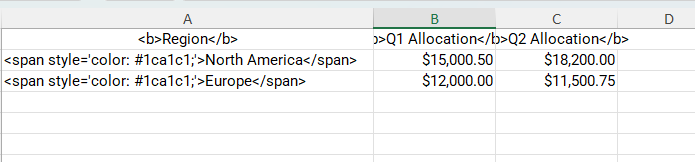
When I did Export To Excel, I have seen the html tags are exported the same way instead of being exported as Styles and I see styles are missing which were added using addStyle and SetCellStyle.
Question
Is there a way to export Styles in Version 1 or Version 2 is the only way we can export styles from Spreadsheet.
Can you provide a detailed explination of the behaviour in both the cases.
The export will preserve the styles assigned to the cells themselves ( via setStyle(), by “styles” property in the data, by a user using a toolbar and so on ).
However, the styling that is assigned to the elements inside the cells ( like <br>/<b> / other tags / inline styles in the cells ) will not be preserved.
v.1 In your example, styles added through a setStyle() will be exported correctly if to update a “background-color” to a “background” in the addStyle(). And you could add other styles in the same way too: Code Snippet .
The expected names for the addStyle options you could check here: addStyle of ui.spreadsheet, Methods Webix Docs .
v.2 There is also another option. Webix widgets have special methods view.$getExportValue() and view.$exportView(), which is responsible for the final result of data export. Here you could loop through the exported values and add the necessary styles or/and modify the data.
The supported cell styling options are listed in the SheetJS documentation.
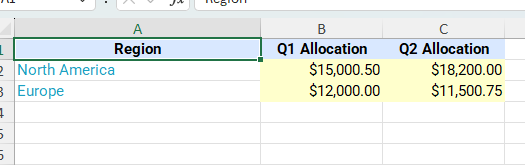
And here is an example showing $exportView() in use, where we add bold styling to the headers: Code Snippet .
While setting styles directly to the cells would be easier, v.2 is an advanced option you could use to customize the export further by your needs .
Sure, the above example with $exportView showed processing of cells with <b> tags only however it’s possible to add processing of another tags as well.
Check this extended example: Code Snippet .
Here I added parsing of the inline styles from the cells too and processing of ‘color’ and ‘font-style’ so you can see such result of the export:
The other kinds of styles you could process by yourself in a similar manner, if needed.
is there any way we can export html tags?
I’m not sure exactly whether you would like to remove the tags from the result or not, but if not, you could simply remove the code in the end of the $exportView function: Code Snippet .